

For a long time, using AI to write code meant an endless cycle of copy-pasting between a chat window and your text editor. While tools like GitHub Copilot brought the AI into the IDE, the experience was often limited to autocompletion or short snippets. OpenAI has fundamentally shifted this workflow by launching the Codex app for macOS. This dedicated desktop environment acts less like a chatbot and more like a command centre for autonomous software development.
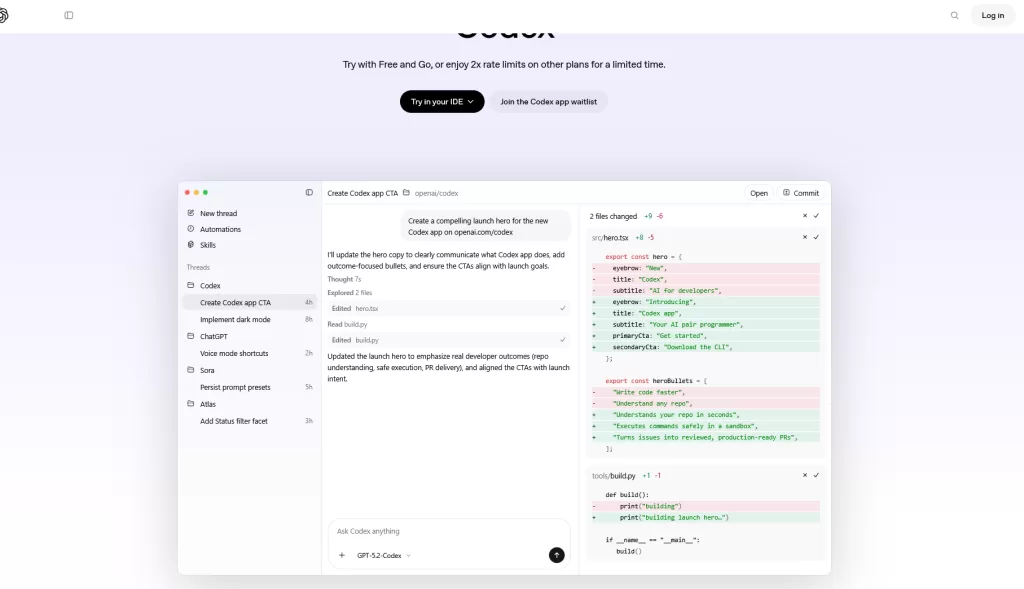
This release signals OpenAI’s direct answer to competitors like Anthropic’s Claude Code, moving beyond simple code generation to “agentic coding.” The core philosophy here is parallelization. The Codex app allows developers to spin up multiple AI agents simultaneously, each working in its own thread organized by project. This means you can have one agent refactoring a legacy module while another drafts unit tests for a new feature, all without losing context or cross-contaminating the chat history.
Under the Hood: Worktrees and GPT-5.2
The technical implementation of this parallel work is what makes the app interesting for serious developers. OpenAI has built native support for git worktrees directly into the application. When you assign a task to an agent, it operates on an isolated copy of your repository. This prevents the common headache of an AI breaking your local build while you are trying to work on something else. You can review the agent’s changes via clean diffs, comment on them for revision, or open the isolated branch in your IDE to make manual tweaks before merging.

Powering these agents is GPT-5.2-Codex, a model OpenAI describes as its strongest coding engine to date. It is designed for “long-horizon” tasks—coding problems that require planning, multiple steps, and self-correction. To support this, the app includes a system-level sandbox that restricts file access to specific folders and requires explicit user permission for high-stakes actions like network requests, balancing autonomy with security.
Skills and Automations
The app also introduces a modular system called “Skills.” These are bundled instructions and scripts that allow Codex to interface with third-party tools. Out of the box, the app includes Skills for fetching design specs from Figma to generate UI code, managing tickets in Linear, or deploying web apps directly to Vercel. Developers aren’t limited to the defaults; the interface allows for the creation of custom Skills to fit specific team workflows.
Perhaps the most practical feature for daily maintenance is “Automations.” This allows users to schedule background tasks that run even when you aren’t actively monitoring the app. You can set Codex to perform daily bug triage, summarize Continuous Integration (CI) failures, or generate release briefs every morning. The results land in a “Review Queue,” waiting for you to sign off rather than demanding your immediate attention.
Availability
The Codex app for macOS is available for download immediately from the OpenAI website. Access is seamless for existing subscribers, as the app is included at no extra cost for those on ChatGPT Plus, Pro, Business, Enterprise, and Edu plans. In a bid to stress-test the system and reward early adopters, OpenAI has temporarily doubled the rate limits for these paid tiers during the launch window. Furthermore, to ensure the tool isn’t just limited to enterprise budgets, the company is also opening access to ChatGPT Free and Go users for a limited time, giving the broader developer community a chance to experiment with this new agentic workflow before deciding if it is worth the upgrade.