

If you have opened a browser in the last twelve months, you have likely been pestered by a sidebar asking to summarize a page you haven’t even read yet, or a pop-up suggesting you rewrite an email that was perfectly fine to begin with. The browser market has become an arms race of generative AI integration, often at the expense of user choice. Mozilla, however, is taking a different approach. With the upcoming release of Firefox 148, the company is introducing a comprehensive suite of “AI Controls” that finally puts the user, not the algorithm, in the driver’s seat.

A Dedicated Control Hub
The centerpiece of this update is a new, centralized section within the browser’s settings menu simply titled “AI Controls.” Previously, toggling these features off required hunting through various sub-menus or, in more extreme cases, diving into the complex about:config page to manually disable flags. Now, everything related to machine learning and generative AI lives under one roof. This move acknowledges a simple truth: while some users find these tools indispensable for productivity, others view them as intrusive bloatware or privacy liabilities. By consolidating these settings, Mozilla is treating AI not as a mandatory upgrade, but as a feature set that requires consent.
The “Nuclear” Option
For the purists who want their browser to simply render websites and nothing else, Mozilla has included a master toggle labeled “Block AI enhancements.” This is effectively a kill switch. Flipping this doesn’t just turn off the current crop of features; it is a forward-looking setting that prevents future AI tools from automatically activating. When this global block is enabled, the browser suppresses all AI-related functionality. This includes the AI chatbot sidebar (which supports providers like ChatGPT, Gemini, and Claude), automated tab grouping suggestions, AI-generated alt text for PDFs, and the link preview summaries that attempt to digest a webpage before you click it. Crucially, it also silences the “onboarding” pop-ups and reminders that typically nag users to try these new features. If you check this box, Firefox promises to leave you alone.
Granular Choice for Power Users
Mozilla recognizes that the issue isn’t always black and white. You might find the local, private translation feature incredibly useful for reading foreign news but have zero interest in a chatbot analyzing your open tabs. The new controls cater to this middle ground by allowing users to manage features individually. In the settings panel, each tool has its own status dropdown. You can set specific features to “Enabled” if you use them daily, or leave them as “Available” if you want them accessible but not active.
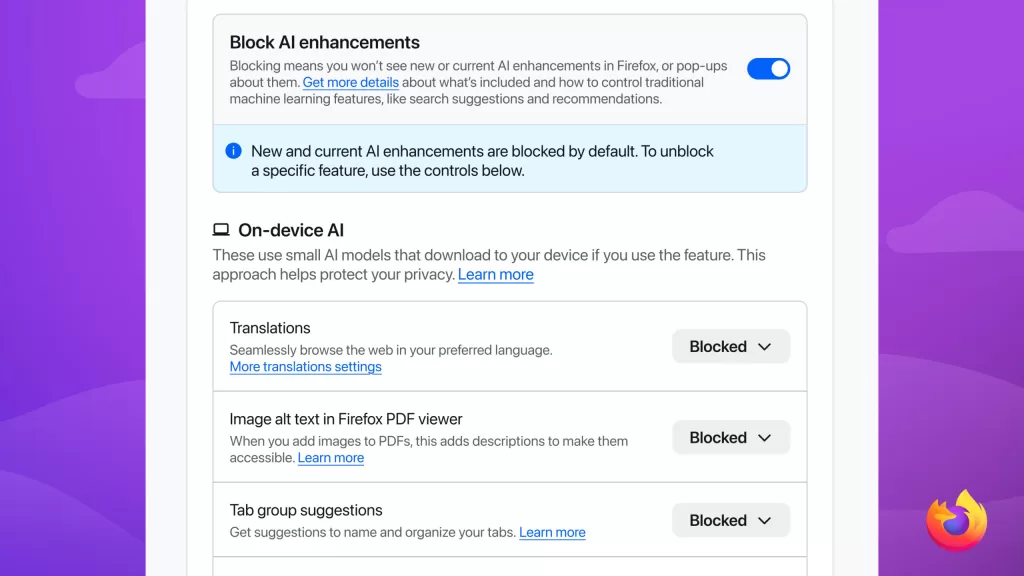
Significantly, this granular control extends to storage management. If a feature relies on on-device models—small AI programs that run locally on your computer rather than in the cloud—setting it to “Blocked” will actually delete those downloaded models from your disk. This is a thoughtful touch for users on devices with limited storage, ensuring that unused AI capabilities aren’t silently consuming gigabytes of space in the background.
Privacy as a Differentiator
This update is a strategic pivot for Firefox. While Chrome and Edge are racing to integrate AI as deeply as possible into the browsing experience—often making it difficult to opt out completely—Mozilla is betting that there is a significant demographic of users who value agency over automation. By making these controls explicit and easy to access, they are positioning Firefox not as the “anti-AI” browser, but as the “consensual AI” browser.
These features will arrive as part of the standard update to Firefox 148, which is scheduled for general release on 24 February 2026. The update is free for all users on macOS, Windows, and Linux. For those who cannot wait and are comfortable with potentially unstable software, the controls are currently available for testing in the Firefox Nightly build, while users on the standard channel can expect the update to arrive automatically later this month.