

Imagine sitting in a taxi, miles away from your office, when you suddenly realize you forgot to export and email a critical presentation. Normally, this would induce immediate panic. However, Anthropic is actively working to eliminate this specific type of modern anxiety. The company has officially rolled out a groundbreaking update that grants its artificial intelligence assistant, Claude, the ability to directly control your computer. Paired with a new remote-control feature called Dispatch, this update fundamentally shifts Claude from a passive chatbot into an active, autonomous digital employee capable of executing complex workflows while you are entirely away from your desk.
Bridging the Gap Between Chatbots and Actions
To understand the magnitude of this update, we have to look at how artificial intelligence typically operates. Until now, you had to manually copy information, paste it into a prompt box, and apply the generated text yourself. The new computer use capability entirely bypasses this manual friction. Claude can now directly interface with your desktop environment exactly like a human would. It can independently move your mouse cursor, click on specific icons, type on a virtual keyboard, open local files, and navigate through web browsers.
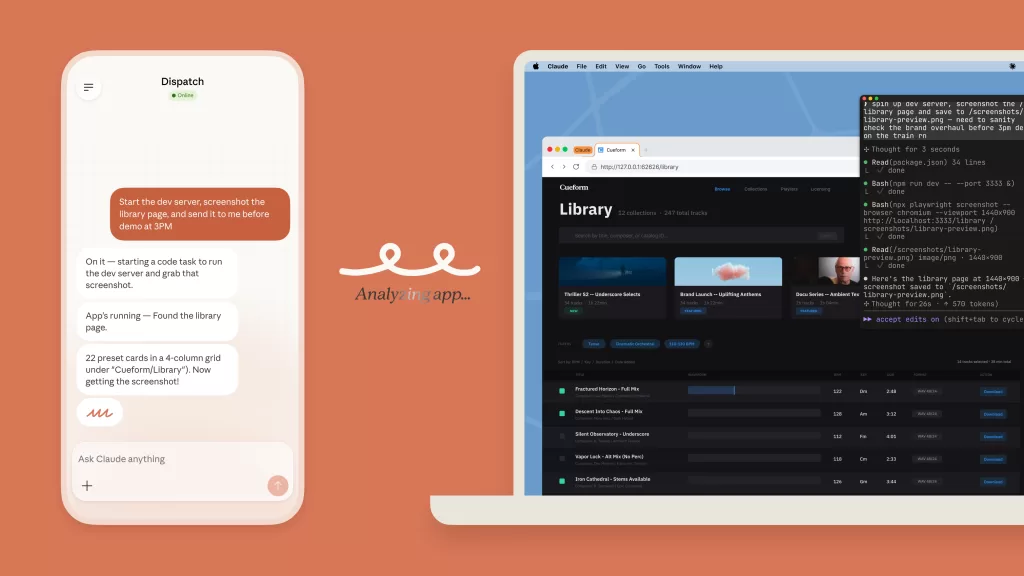
When you assign the artificial intelligence a task, it attempts a highly logical sequence of operations. First, it looks for established backend connectors to supported applications like Slack or Google Workspace. If a direct integration is unavailable, Claude does not simply give up. Instead, it seamlessly transitions to manual computer use, actively reading your screen to find the right application, scrolling through interfaces, and clicking the necessary buttons to force the task through to completion.
Controlling Your Workstation Remotely With Dispatch
This capability becomes incredibly powerful when paired with Dispatch, a newly introduced feature that acts as a persistent remote control for your desktop. By linking the Claude mobile application to your desktop software, you can issue commands from your smartphone no matter where you are. You can simply text your phone to ask Claude to analyse a local spreadsheet, draft a summary report, and email it to your team. The artificial intelligence takes over your workstation back at the office, executing the entire sequence autonomously so the finished work is waiting for you when you return.
Security Guardrails and Current Limitations
Naturally, handing over the keys to your personal computer raises immediate and severe security concerns. Anthropic is highly aware of the risks involved in allowing an artificial intelligence to autonomously click through a machine containing sensitive personal and corporate data. To mitigate these risks, the system is built on a strict permission-first architecture. Claude will always explicitly ask for your approval before opening a new application, and you retain the ability to instantly halt its actions at any time. Furthermore, the company has implemented backend safeguards specifically designed to detect and block malicious prompt injections that could attempt to hijack the agent.
Despite these guardrails, Anthropic is treating this rollout with immense caution. The computer use functionality is currently designated as a research preview and is strictly limited to macOS devices for users subscribed to the premium Claude Pro and Claude Max tiers. The company acknowledges that the system is still in its infancy. Complex tasks may occasionally require a second attempt, and the artificial intelligence will naturally navigate a graphical interface more slowly than a direct software integration. Anthropic strongly advises against giving the model access to highly sensitive data or critical accounts during this early testing phase.
Additionally, there are practical hardware limitations to consider. For Dispatch and computer use to function, your desktop computer must remain awake, connected to the internet, and have the Claude application actively running. If your machine goes to sleep, your remote assistant goes offline with it.